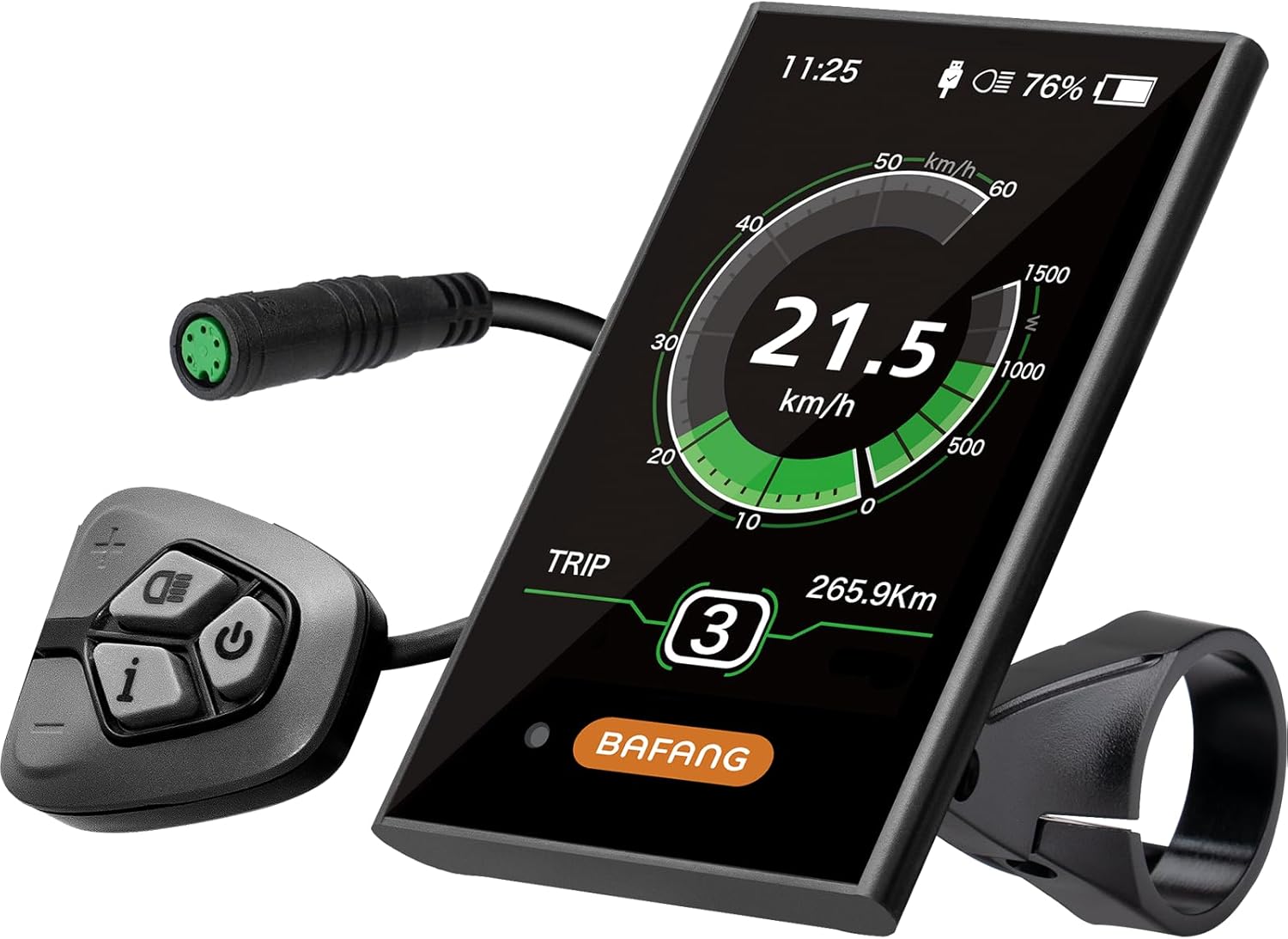
BAFANG DPC18 Color Display
Bafang's 3.5-inch color DPC18 for UART motors, with automatic backlight, nine assist levels and a USB charging port.
- Handlebar display
The display is the BBSHD's ignition key, assist selector and fault reader in one. Pick the screen you can read at speed on a bright trail, and make sure its plug and protocol match your motor before anything else.
Up to date · September 2026For a UART BBSHD, the Bafang DPC18 is the fullest color option, the C961 the simplest, and the 500C and 850C sit between with small and large color screens. All use the 5-pin plug. CAN-bus BBSHD kits need CAN displays instead, and riding with no display takes a bypass plug and some programming.


On a BBSHD the display does far more than show numbers. It switches the controller on, sets the assist level, reports faults and, on most models, holds basic settings such as wheel size and speed limit. Choose it for the ride you do, then check the plug.
The best display for a Bafang BBSHD is the one you can read in a glance at trail speed. A trail rider on rough ground wants large digits and a screen that does not wash out; a commuter may want a clock, trip data and a USB port for a phone.
Mount the display where your eyes already go, near the stem, and the keypad where your thumb rests without leaving the grip.
Display settings overlap with the controller's programming. What a display can change on its own, and what still needs the USB cable, is split out in the programming guide.
| Display | Screen | Controls | Protocol | Extras |
|---|---|---|---|---|
| Bafang DPC18 | 3.5-inch color | Separate handlebar pad | UART (a CAN version exists) | USB 5V port, auto backlight, IPX5, PAS 0–9 |
| C961 | 2.7-inch LCD | Buttons | UART | Auto backlight, IP54, 3/5/9 levels |
| 500C | Compact color | Separate keypad | UART, 5-pin | Speed, trip and battery data, IP65 on common versions |
| 850C | Larger color | Separate keypad | UART, 5-pin | More data fields on screen, IP65 on common versions |
| CAN displays (DP C010, DPC080, EKD01, VD04) | Varies | Varies | CAN bus only | Settings on the screen or in the Bafang Go app |
Screen sizes and ratings are the makers' figures. The 500C and 850C are sold under several brands; check that the version you choose names UART and the 5-pin plug.
The two most common upgrades on a UART BBSHD sit at opposite ends. The Bafang DPC18 is a 3.5-inch color display with automatic backlight, nine assist levels, IPX5 sealing and a 5V USB port. The C961 is a 2.7-inch LCD with automatic backlight, IP54 sealing and buttons on the unit.
The DPC18 suits riders who want everything on one screen and a way to top up a phone on a long ride. It is controlled from a separate handlebar pad, so the screen can mount by the stem while your thumb stays on the grip.
The C961 is the display many riders keep as a spare. It is small enough to live in a tool bag, and swapping it takes seconds if a crash cracks the main screen.
Check the version before ordering the DPC18. Bafang makes it in UART and CAN versions, and some are offered with a choice of protocol, so confirm the one you choose matches your motor.
Both displays read the same error codes. The troubleshooting guide lists what the common ones mean.
|
BAFANG DPC18 Color Display |
Zeekpowa C961 Display |
Forbestcy DPC18 Color Display |
 BAFANG TFT Display (C18, 860C, 750C, C965, 600C)
 |
 E-Mangue 1T4 Wiring Harness
 |
 Zeekpowa Programming Cable
 | |
| Type | Display | Display | Display | Display | Cables & programming | Cables & programming |
| Protocol | — | UART | UART | — | — | — |
| Shop now | Shop now | Shop now | Shop now | Shop now | Shop now |
Between the DPC18 and the C961 sit the 500C and the 850C, two color displays sold under several brands for Bafang motors. The 500C is the compact one; the 850C gives a larger screen with more data fields. Both use the 5-pin UART plug on the versions made for the BBSHD.
These displays are popular for the same reason: color readouts at a moderate size, with a separate keypad by the grip. The Forbestcy range offers 500C, P850C and 860C versions for BBS01, BBS02 and BBSHD motors, rated IP65 and for use down to -20°C.
One catch applies to both. Some versions add Bluetooth or are built for other motor families, so read the protocol and plug before choosing; the 750C Bluetooth version in the Forbestcy range, for example, works only with iPhones.
If you tweak settings often, color displays also make it easier to watch current draw after a settings change.
The C961 puts speed, battery and assist level on a 2.7-inch LCD with automatic backlight and buttons on the unit. It works with BBS01, BBS02 and BBSHD motors on the UART protocol, and nothing else.
Shop nowDisplay questions on a BBSHD always end at the connector. The classic BBSHD uses the UART protocol through a 1T4 harness, and every UART display for it uses a 5-pin plug. The newer CAN-bus BBSHD kits use a different protocol and a different family of displays.
The 1T4 harness is the junction box. Its 8-pin plug meets the motor, and it splits into the 5-pin display lead, the 3-pin throttle lead and 3-pin brake leads.
Plug gender matters too. UART displays for these motors carry a female 5-pin plug that meets the harness; check pins for bends before pushing it home.
If you have a mystery motor, look at the harness. A 1T4 with an 8-pin plug is the UART layout; a kit sold as CAN bus will say so on the motor label and in its manual.
For the full diagram, open the controller and wiring guide.
Some riders want a clean cockpit with nothing but a throttle, or a spare way home when the display dies. A UART BBSHD will not switch on by itself, because the display supplies the power-on signal, but it can run without one with the right plug and settings.
The trade-offs are real. You lose the speed readout, the battery gauge, assist changes on the move and, most importantly, error codes. A fault shows up only as a motor that stops helping.
A programming cable is required for the first step either way. Designated assist and throttle-only setups are both set in software, with values in the programming guide.
For a UART BBSHD, the DPC18 is the fullest color option and the C961 the simplest; the 500C and 850C sit between. CAN-bus kits need CAN displays.
Yes, with a bypass plug and the designated assist level programmed to a fixed number. You lose speed, battery and error readouts.
Only those made for its protocol. UART motors take 5-pin UART displays; CAN-bus kits take CAN displays, and mixing them does not work.
The DPC18 has a 3.5-inch color screen, USB charging and a separate handlebar pad. The C961 is a compact 2.7-inch LCD, simpler and easy to keep as a spare.
UART displays for the BBSHD use a 5-pin plug into the 1T4 harness. CAN-bus displays use the CAN kit's own connector.
