

Zeekpowa C961 Display
Zeekpowa C961, a 2.7-inch LCD with automatic backlight and selectable assist levels for BBS motors.
- Handlebar display
- UART version
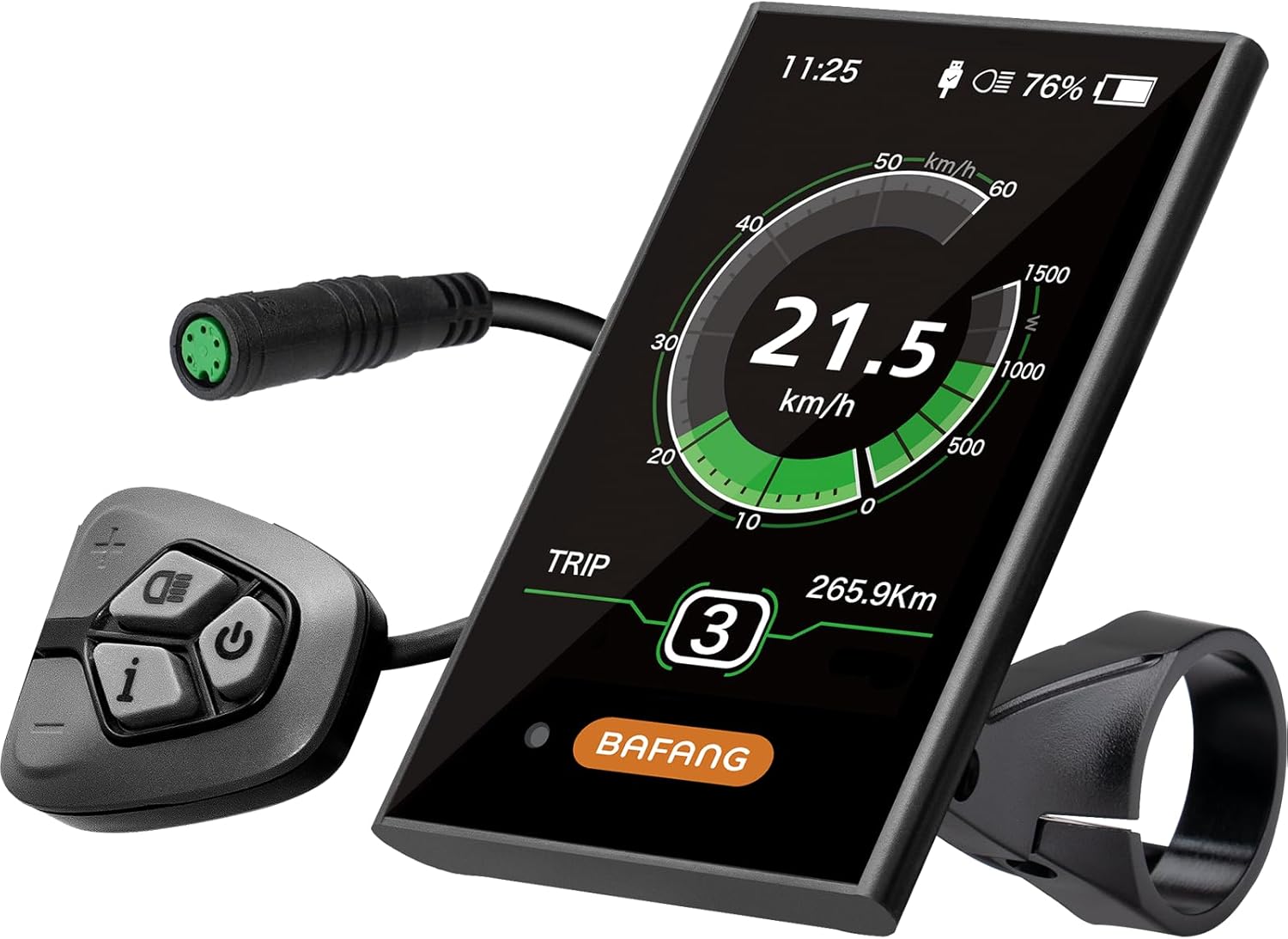
The DPC18 is Bafang's big colour display for its mid-drives: a 3.5-inch screen with automatic backlight, assist levels 0–9 and a USB port to top up a phone. It is run from a separate handlebar button pad, and it comes in a 5-pin UART version and a DPC18/C010 version offered in UART or CAN.
At 25 mph on a rough descent, a small grey screen is hard to read. The DPC18 answers that with a 3.5-inch colour display, large enough to take in speed, battery and assist level with a glance. The backlight adjusts to the light around it, so the screen stays readable under trees, in low sun and after dark.
Assist runs from 0 to 9. Level 0 turns the motor off for plain pedalling, and the higher steps build up to full power, which gives fine control on long climbs where you want just enough help to keep the motor cool.
The screen itself carries no buttons you need to reach while riding. A separate handlebar button pad sits by the left grip, so your thumb changes assist without leaving the bar, and the screen can mount centrally by the stem where your eyes find it.
That split is a real advantage on a trail bike. The screen stays out of the way of a dropper remote or a shifter, and a crash that knocks the pad does not take the display with it.
The BBSHD display guide compares it with the C961, the 500C and the 850C.
| Spec | Value |
|---|---|
| Brand | BAFANG |
| Model | DPC-18 |
| Screen | 3.5-inch colour HD |
| Backlight | Automatic, follows ambient light |
| Assist levels | 0–9 |
| USB port | DC 5V output for phone charging |
| Sealing | IPX5 |
| Connector | 5-pin waterproof plug |
| Protocol | UART on the 5-pin version; UART or CAN on the DPC18/C010 version |
| Motors | BBS01B, BBS02B, BBSHD |
| Extra motors (DPC18/C010 version) | M400, M500 |
| Mounting | Handlebar |
| Controls | Separate handlebar button pad |
| Compatibility limit | Bafang motors only |
The DPC18 comes in two forms, and the protocol decides which one works on your bike. The 5-pin version is a UART display for the BBS01B, BBS02B and BBSHD. The DPC18/C010 version is offered in UART or CAN protocol and also names the M400 and M500 motors.
| Your motor | Harness clue | Order |
|---|---|---|
| Classic BBSHD | 1T4 harness, 5-pin display lead | DPC18 5-pin UART |
| CAN-bus BBS-HD | Kit sold as CAN; CAN displays | DPC18/C010, CAN option |
| BBS01B or BBS02B | 1T4 harness | DPC18 5-pin UART |
| M400 or M500 | Check the motor manual | DPC18/C010, matching protocol |
Most BBSHD motors on the road are the classic UART type, with a 1T4 harness that splits into the display, throttle and brake leads. For those, the 5-pin DPC18 is a direct plug-in. When ordering the DPC18/C010 version, confirm the protocol option before checkout, because one name covers both. A CAN display that arrives for a UART bike is a return, not a fix.
The CAN-bus kit page explains how that system handles displays and programming.
Fitting the DPC18 takes ten minutes. The screen clamps to the handlebar near the stem, the button pad goes by the left grip, and one lead runs back to the harness. Plan the layout before tightening anything, because a trail bike's bar already carries brakes, a shifter and often a dropper remote.
Look at the pins before connecting. New display stays dark? Look for a bent pin first; straightening one with a small screwdriver takes seconds.
Once powered, work through the display settings. On a UART system the display holds basics such as wheel size, units and the speed limit, while deeper motor settings such as current and launch live in the controller.
For controller settings on a UART HD, you still need a 5-pin programming cable and a laptop. Start with the values the programming guide flags first.


The DPC18 is the large, full-colour choice for a BBSHD. Smaller screens trade size for a cleaner bar, and some riders run one of each: the DPC18 on the bike and a cheap mono display in the tool bag as a backup.
| Display | Screen | Sealing | Suits |
|---|---|---|---|
| Bafang DPC18 | 3.5-inch colour | IPX5 | Most data at a glance, USB charging |
| Zeekpowa C961 | 2.7-inch LCD | IP54 | Compact cockpit, spare display |
| 500C / 850C | Colour, smaller or larger | IP65 | Colour without the large footprint |
Bar space is the DPC18's main cost. A 3.5-inch screen needs a clear patch of bar by the stem, and on a narrow commuter cockpit already carrying a bell, lights and a phone mount, the smaller C961 may simply fit better.
A backup display earns its place on remote rides. If a crash cracks the main screen on a UART HD, the motor will not switch on without a display or a bypass plug, and a spare in the bag turns a long push into a quick swap.
You need three things in place: a Bafang motor, the right protocol version and a harness with a free 5-pin display lead. Error codes read the same across Bafang displays, so the troubleshooting notes on the clutch and error codes page apply to all of them.
Yes. The 5-pin UART version fits the classic BBSHD, BBS01B and BBS02B. A CAN-bus HD needs the CAN option of the DPC18/C010 version.
No. You run it from a separate handlebar button pad, which lets the screen mount by the stem while your thumb stays on the grip.
Yes. It has a DC 5V USB port for topping up a phone on the ride.
On a UART system it holds basics such as wheel size, units and the speed limit. Current and launch settings need a programming cable and a laptop.