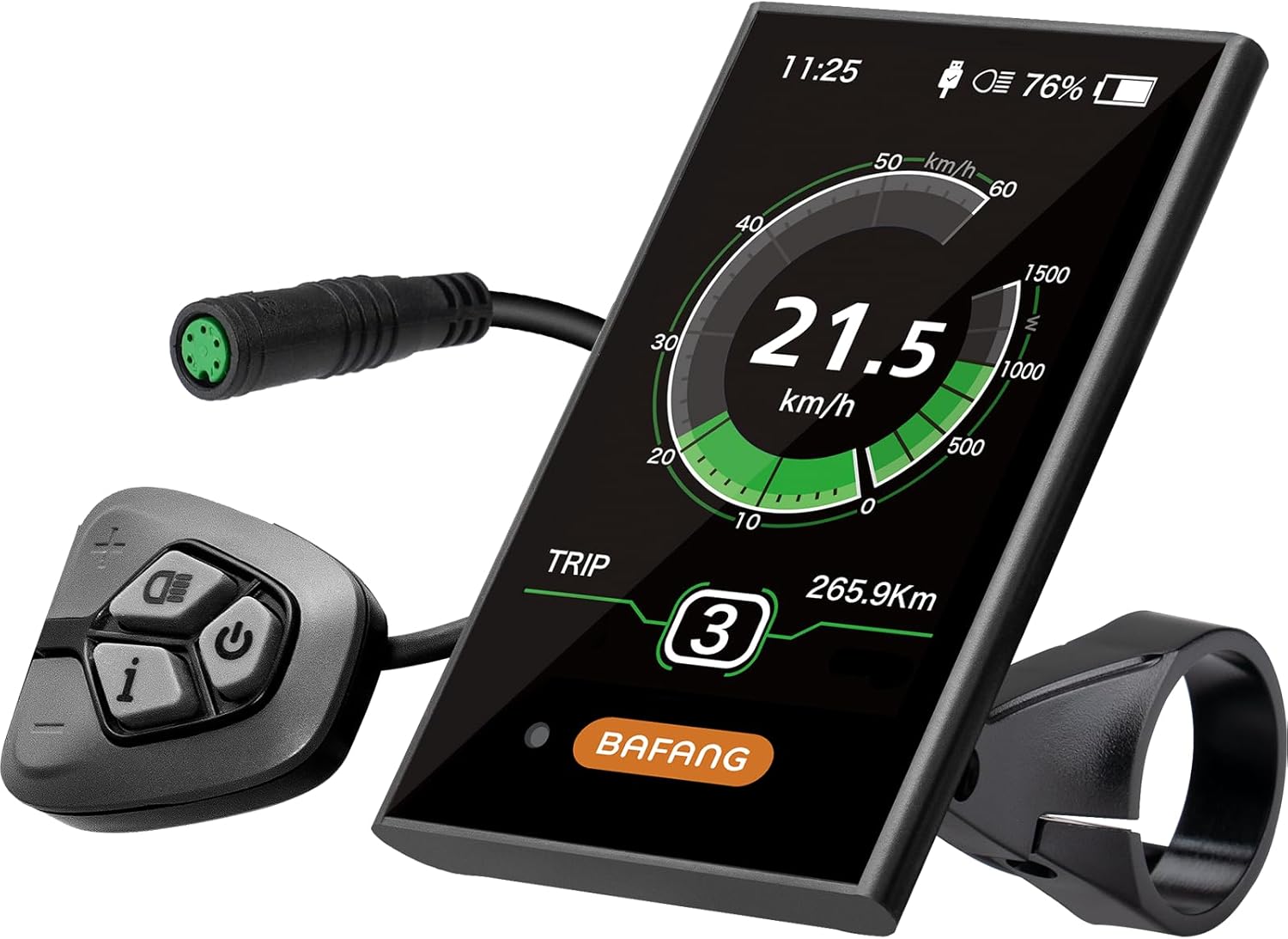
BAFANG DPC18 Color Display
BAFANG's DPC18 is a 3.5-inch colour UART screen with automatic backlight, PAS levels 0 to 9 and a 5V USB charging port.
- Handlebar display

A BAFANG handlebar display offered as five different screens, the C965, 860C, 750C, C18 and 600C, for BBS01B, BBS02B and BBSHD mid drives. The default configuration is the TFT C18. The 500C and 850C are not among the choices, so pick by model name, not by family name.
This is not a single display. It is one BAFANG offer with five screens to choose from: the C965, the 860C, the 750C, the C18 and the 600C. The configuration shown as standard is the TFT C18. All five are listed for the BBS01B, BBS02B and BBSHD mid drives.
The name people search for, 500C or 850C, is not in the set. Both are popular Bafang colour screens for these motors, but if one of those two is what you want, this family does not include it. The 500C and 850C go head to head in the display guide.
What each option brings, in broad terms:
| Screen | Type | Suits |
|---|---|---|
| C965 | Monochrome LCD | Riders who want the basics, big and readable |
| 860C | Colour TFT | Riders who want colour with the buttons on a separate pad by the grip |
| 750C | Colour TFT | Colour riders who want the option of a Bluetooth version |
| C18 | Colour TFT, the standard pick | A compact colour screen from the same family as Bafang's DPC18 |
| 600C | Colour | Riders who want colour without the C18 or 860C layout |
Every option shares the same core readouts: average, maximum and real-time speed, odometer, trip distance, a clock and riding time. The standard configuration carries an IP65 rating, and the spec lists button control, so plan on buttons rather than touch.
Choose the model first, then confirm its plug and protocol match your motor. That is the step that decides whether the screen lights up on the first try.
| Spec | Value |
|---|---|
| Brand | BAFANG |
| Screen options | C965, 860C, 750C, C18, 600C |
| Default model | TFT C18 |
| Display type | LCD (colour TFT on the C-series colour models) |
| Compatible motors | Bafang BBS01B, BBS02B, BBSHD mid drives |
| Speed readouts | Average, maximum, real-time |
| Distance readouts | ODO, trip distance |
| Time readouts | Clock, riding time |
| Speed source | The motor's wheel speed sensor |
| Waterproof rating | IP65 |
| Input | Buttons |
| Connectivity | Bluetooth on the Bluetooth-equipped screen option |
| Harness connection | Display branch of the 1T4 cable |
| Mounting | Handlebar |
| Unit count | 1 display |
A BBSHD display is more than a speedometer. It is where you pick the assist level, watch the battery fall on a long grade and read the error code when something goes wrong. On a 1000W motor that can empty a pack on one long climb, what the screen shows and how clearly it shows it matter.
The shared readouts cover what most riders check on a ride:
Colour screens make that reading easier. Assist level, speed and battery sit in different colours and sizes, and a glance is enough at speed on a rough descent. The mono C965 does the same job with plainer graphics and is easy to read in direct sun.
IP65 means the display is protected against dust and water jets from any direction. That covers rain and trail spray. It does not make a pressure washer safe; keep the jet off the screen and the plug.
The screen also reports faults from the motor, controller and sensors. Decode the common numbers with the error-code guide.
On a UART BBSHD the display connects to the display branch of the 1T4 harness, the 5-pin plug that also takes a programming cable. Swapping screens is usually a plug-and-clamp job, with no tools beyond a hex key for the handlebar mount.
Before you fit it, check the one variable that trips people up: protocol. Bafang builds many of its colour screens in both UART and CAN-bus versions. A classic BBSHD with the 1T4 harness is UART, while newer CAN-bus kits need CAN screens. To tell which you have, check the plug types listed in the controller guide.
Get the wheel size right, because everything else leans on it. The controller calculates speed from wheel turns, so a fat bike on 26 x 4.8 tyres needs its real size entered or the speed and the speed limit will both read wrong.
Display menus change a few settings, but they do not open the deeper controller values like current per assist level or throttle ramp. For those, take the USB cable route set out in the programming guide.
Leave a gentle loop in the display cable so the bars can turn fully without pulling on the plug.


With five options behind one name, pick by what you want on screen mid-ride and where you ride. None of them changes how the motor performs; they change what you see and how you switch assist levels. Pick by cockpit space, light conditions and taste. Compare each option's housing depth with your old display, since a deeper screen sits higher above the stem and catches more knocks in a crash.
A simple way to decide:
Settle three details at the bench: the protocol of the version you select, the plug on your 1T4 harness, and whether a separate button pad will fit next to your throttle and shifter. Screens with remotes free up space on the display itself but add one more part on the left grip.
Against the alternatives, the BAFANG DPC18 is a 3.5-inch colour screen with a 5V USB port and automatic backlight, and the Zeekpowa C961 is a 2.7-inch mono LCD that keeps the cockpit simple and light. The Forbestcy screen covers the 500C and 850C family that this one leaves out.
No. The five screen options are the C965, 860C, 750C, C18 and 600C. The 500C and 850C are separate Bafang models.
The standard configuration is the TFT C18. You choose among the five options when ordering.
Only if the screen you choose is the CAN version. Classic BBSHD kits with the 1T4 harness are UART and need UART screens.
Display menus handle settings like wheel size, units and speed limit. Current per assist level and throttle ramp need the programming cable.